
Published
- 12 min read
Keycloak Custom SPIs: Authenticators, Password Policies and IdP Mappers
A practical guide to extending Keycloak 26.x with Java 21 — and keeping your extensions alive through version upgrades.
Every Keycloak project hits the same wall.
You configure the realm, wire up the clients, adjust the theme — and then a requirement lands that the admin console simply cannot express.
Block passwords that contain the user’s own name. Add a confirmation step only for flagged accounts. Read a role out of a nested claim your customer’s IdP insists on sending.
At that point you stop configuring Keycloak and start extending it.
This guide builds three real extensions — an authenticator, a password policy provider, and an identity provider mapper — then covers the part most tutorials skip: keeping them working when Keycloak upgrades.
All code is on GitHub: keycloak-spi-examples
Prerequisites
- Java 21 and Maven 3.9+
- Docker, for running Keycloak locally
- Keycloak 26.x
- You have configured a realm before — this guide assumes the basics
When config isn’t enough
Before writing Java, rule out the cheaper options.
An extension is code you own forever, including through every upgrade.
| Requirement | Reach for | Write an SPI? |
|---|---|---|
| Change login page look and wording | Custom theme | No |
| Add or rename a token claim | Built-in protocol mapper | No |
| Standard password rule (length, digits, reuse) | Built-in password policies | No |
| Route users through different login steps | Authentication flow with built-in executions | No |
| Map a flat claim from an external IdP | Built-in IdP mapper | No |
| Validate a password against your own business rules | Password Policy SPI | Yes |
| Add a login step with custom logic or an external call | Authenticator SPI | Yes |
| Map a nested, array or conditional claim | IdP Mapper SPI | Yes |
| React to login/registration events (audit, provisioning) | Event Listener SPI | Yes |
The rule I use: if a built-in feature gets you 80% of the way, bend the requirement instead of writing an SPI.
Every extension is a compatibility liability at upgrade time. Earn it.
How the SPI model actually works
Keycloak is built almost entirely out of swappable providers. Your code plugs into the same mechanism the server uses internally.
Three pieces, always:
- Provider — the class that does the work. Created per request, never share state in it.
- ProviderFactory — created once at startup. Holds config and produces providers.
- Service file — a plain text file under
META-INF/servicesthat tells Keycloak your factory exists.
You package these into a JAR, drop it into providers/, and run kc.sh build.
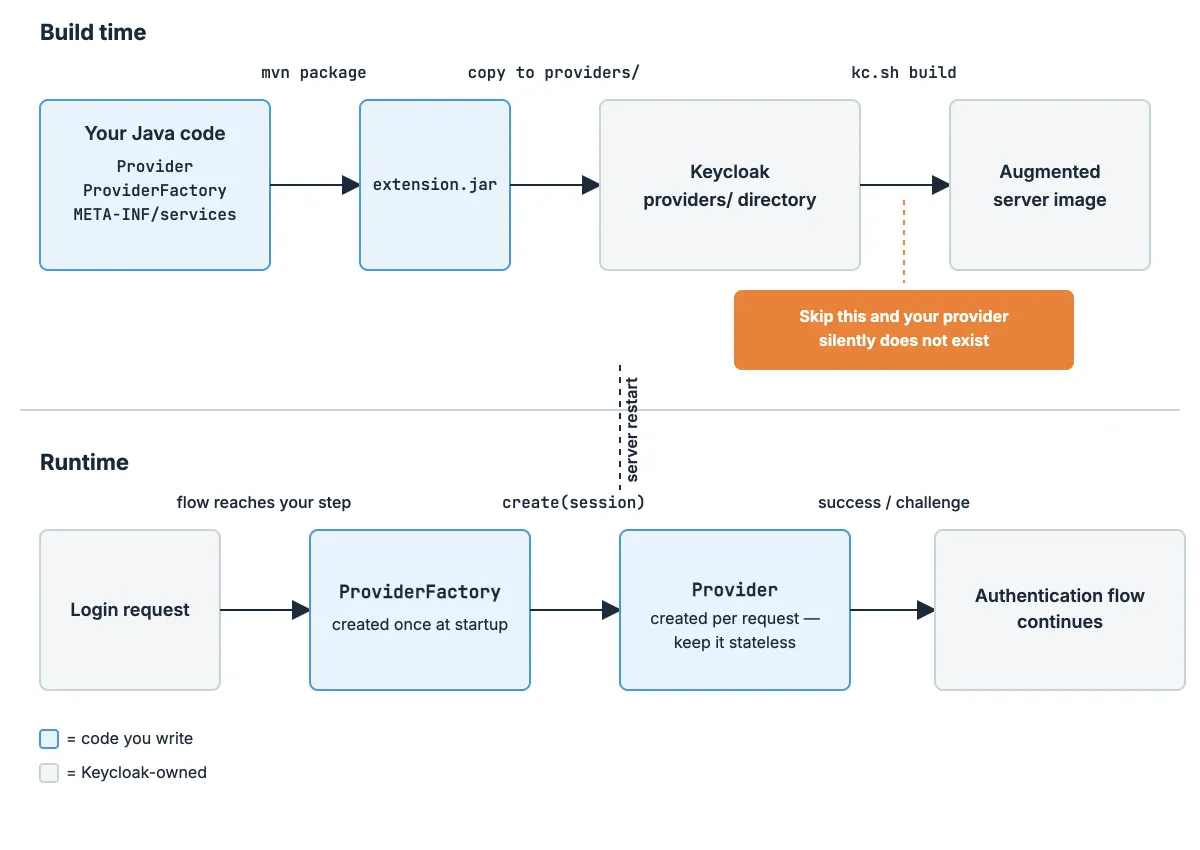
One thing that trips up everyone coming from WildFly-era Keycloak: the Quarkus distribution requires a build step. Dropping a JAR into the folder is not enough. If you skip kc.sh build, your provider silently does not exist.
Project setup
A minimal pom.xml. Note every Keycloak dependency is provided — the server supplies them at runtime, and shipping them inside your JAR causes classloader conflicts.
       <properties>
    <maven.compiler.release>21</maven.compiler.release>
    <keycloak.version>26.0.7</keycloak.version>
</properties>

<dependencies>
    <dependency>
        <groupId>org.keycloak</groupId>
        <artifactId>keycloak-server-spi</artifactId>
        <version>${keycloak.version}</version>
        <scope>provided</scope>
    </dependency>
    <dependency>
        <groupId>org.keycloak</groupId>
        <artifactId>keycloak-server-spi-private</artifactId>
        <version>${keycloak.version}</version>
        <scope>provided</scope>
    </dependency>
    <dependency>
        <groupId>org.keycloak</groupId>
        <artifactId>keycloak-services</artifactId>
        <version>${keycloak.version}</version>
        <scope>provided</scope>
    </dependency>
</dependencies>
keycloak-server-spi-privateis exactly what its name says. Classes in it can change between minor versions without notice. Use it when you must, and list every usage somewhere you will look before an upgrade.
Pin keycloak.version to the exact server version you run. Not a range, not LATEST. This single property is what makes upgrades a controlled exercise later.
Run it locally with Docker Compose:
       services:
  keycloak:
    image: quay.io/keycloak/keycloak:26.0.7
    command: ['start-dev', '--log-level=INFO,com.onloadcode.keycloak:DEBUG']
    environment:
      KC_BOOTSTRAP_ADMIN_USERNAME: admin
      KC_BOOTSTRAP_ADMIN_PASSWORD: admin
    ports:
      - '8080:8080'
    volumes:
      - ./target/keycloak-spi-examples.jar:/opt/keycloak/providers/spi-examples.jar
The --log-level flag adds a DEBUG category for your own package only. You will want this in about ten minutes.

Extension 1: a custom Authenticator
The requirement: accounts carrying a requiresReview attribute must confirm an extra screen before finishing login. Everyone else logs in normally.
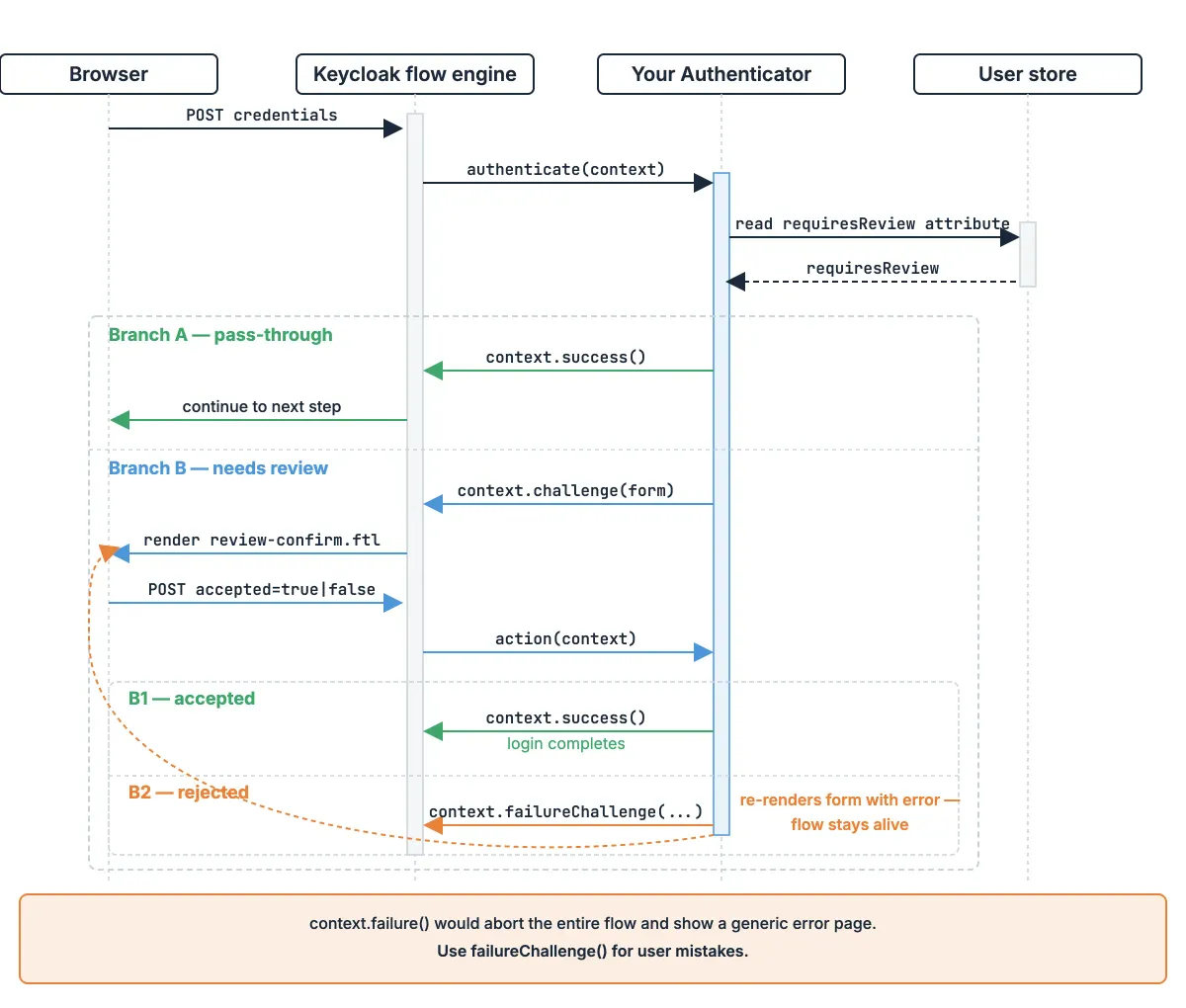
An authenticator has two entry points:
authenticate()— called when the flow reaches your step. Either pass through, or render a challenge.action()— called when the user submits the form you rendered.
Start with the provider:
       public class ReviewConfirmAuthenticator implements Authenticator {

    @Override
    public void authenticate(AuthenticationFlowContext context) {
        UserModel user = context.getUser();

        if (!Boolean.parseBoolean(user.getFirstAttribute("requiresReview"))) {
            context.success();   // not applicable — move on
            return;
        }

        Response challenge = context.form()
                .createForm("review-confirm.ftl");
        context.challenge(challenge);
    }
Then the submission handler:
           @Override
    public void action(AuthenticationFlowContext context) {
        MultivaluedMap<String, String> form =
                context.getHttpRequest().getDecodedFormParameters();

        if (!"true".equals(form.getFirst("accepted"))) {
            context.failureChallenge(
                    AuthenticationFlowError.INVALID_CREDENTIALS,
                    context.form()
                           .setError("reviewNotAccepted")
                           .createForm("review-confirm.ftl"));
            return;
        }

        context.getUser().removeAttribute("requiresReview");
        context.success();
    }

    @Override
    public boolean requiresUser() {
        return true;
    }

    @Override
    public boolean configuredFor(KeycloakSession s, RealmModel r, UserModel u) {
        return true;
    }

    @Override
    public void setRequiredActions(KeycloakSession s, RealmModel r, UserModel u) { }

    @Override
    public void close() { }
}Never call
context.failure()for a user mistake. It aborts the whole flow and shows a generic error page.failureChallenge()re-renders your form with a message, which is what users actually need.
The factory is boilerplate, but two methods matter: getId() is the string Keycloak stores in the realm config, and getRequirementChoices() controls which REQUIRED/ALTERNATIVE/DISABLED options the admin console offers.
       public class ReviewConfirmAuthenticatorFactory implements AuthenticatorFactory {

    public static final String ID = "review-confirm-authenticator";

    private static final AuthenticationExecutionModel.Requirement[] CHOICES = {
            AuthenticationExecutionModel.Requirement.REQUIRED,
            AuthenticationExecutionModel.Requirement.DISABLED
    };

    @Override public String getId() { return ID; }
    @Override public String getDisplayType() { return "Review Confirmation"; }
    @Override public String getReferenceCategory() { return null; }
    @Override public boolean isConfigurable() { return false; }
    @Override public boolean isUserSetupAllowed() { return false; }
    @Override public String getHelpText() {
        return "Requires flagged users to confirm a review screen.";
    }

    @Override
    public AuthenticationExecutionModel.Requirement[] getRequirementChoices() {
        return CHOICES;
    }

    @Override
    public Authenticator create(KeycloakSession session) {
        return new ReviewConfirmAuthenticator();
    }

    @Override public List<ProviderConfigProperty> getConfigProperties() {
        return List.of();
    }
    @Override public void init(Config.Scope config) { }
    @Override public void postInit(KeycloakSessionFactory factory) { }
    @Override public void close() { }
}
getId()is permanent. It is written into every realm that uses your authenticator. Renaming it later orphans the execution in existing realms and breaks their login flow.
Register it:
src/main/resources/META-INF/services/org.keycloak.authentication.AuthenticatorFactorywith a single line containing the fully-qualified factory class name.
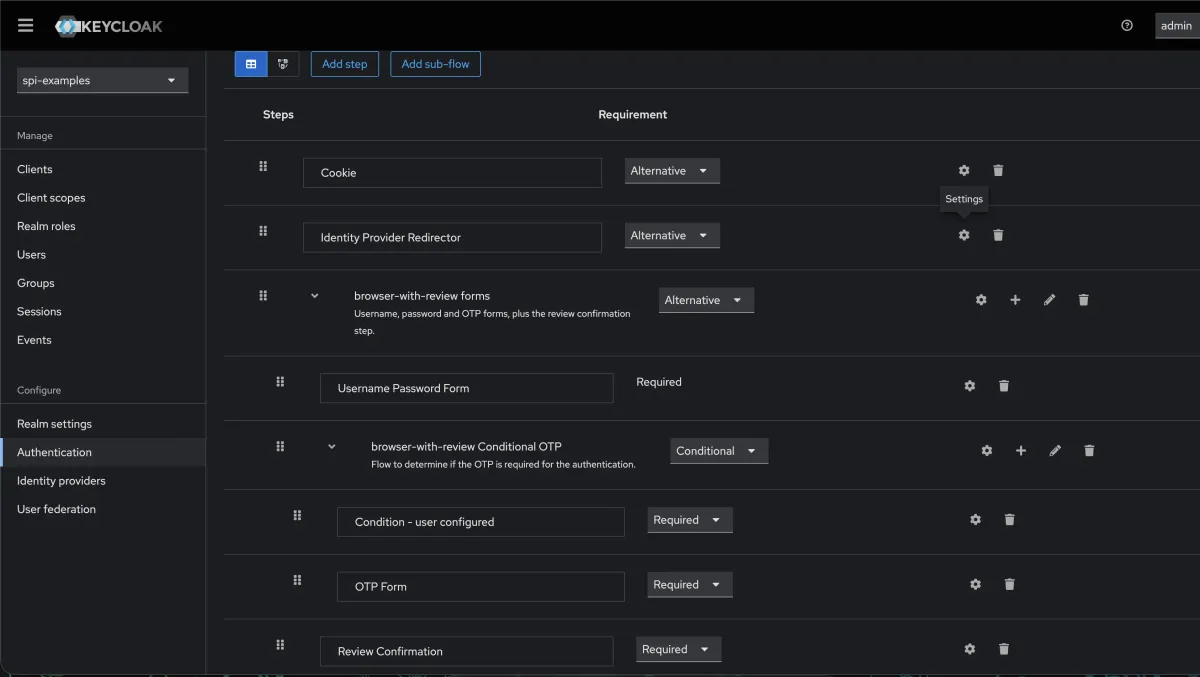
To use it, copy the built-in browser flow (you cannot edit built-in flows), add your execution after the password step, and bind the copy to the realm.
Extension 2: a custom Password Policy Provider
The requirement: reject passwords containing the username, the email local-part, or the first/last name.
Built-in policies cover length, digits, case, reuse and Have-I-Been-Pwned integration. They do not cover “must not contain the user’s own identity”, which is a common audit finding.
       public class NoIdentityInPasswordProvider implements PasswordPolicyProvider {

    private final KeycloakSession session;

    public NoIdentityInPasswordProvider(KeycloakSession session) {
        this.session = session;
    }

    @Override
    public PolicyError validate(RealmModel realm, UserModel user, String password) {
        Stream<String> identityParts = Stream.of(
                user.getUsername(),
                localPart(user.getEmail()),
                user.getFirstName(),
                user.getLastName());

        String lower = password.toLowerCase(Locale.ROOT);

        boolean hit = identityParts
                .filter(Objects::nonNull)
                .map(s -> s.toLowerCase(Locale.ROOT))
                .filter(s -> s.length() >= 3)
                .anyMatch(lower::contains);

        return hit ? new PolicyError("invalidPasswordIdentityMessage") : null;
    }
The second overload is called during registration, before a UserModel exists:
           @Override
    public PolicyError validate(String username, String password) {
        if (username != null && username.length() >= 3
                && password.toLowerCase(Locale.ROOT)
                           .contains(username.toLowerCase(Locale.ROOT))) {
            return new PolicyError("invalidPasswordIdentityMessage");
        }
        return null;
    }

    @Override
    public Object parseConfig(String value) {
        return null;   // this policy takes no configuration
    }

    @Override
    public void close() { }

    private static String localPart(String email) {
        return email == null ? null : email.split("@")[0];
    }
}Returning
nullmeans the password passed. Returning aPolicyErrormeans it failed. It reads backwards the first time — get it wrong and you have a policy that accepts everything, silently.
The PolicyError argument is a message key. Add it to a theme-resources/messages bundle in your provider JAR — Keycloak merges it into whichever login theme is active, no custom theme required — or users see a raw key on screen:
       # src/main/resources/theme-resources/messages/messages_en.properties
invalidPasswordIdentityMessage=Password must not contain your name, username or email.
The factory declares the policy so it appears in the realm’s password policy dropdown:
       public class NoIdentityInPasswordProviderFactory
        implements PasswordPolicyProviderFactory {

    public static final String ID = "noIdentityInPassword";

    @Override public String getId() { return ID; }
    @Override public String getDisplayName() { return "Not Containing Identity"; }
    @Override public String getConfigType() { return null; }
    @Override public String getDefaultConfigValue() { return null; }
    @Override public boolean isMultiplSupported() { return false; }

    @Override
    public PasswordPolicyProvider create(KeycloakSession session) {
        return new NoIdentityInPasswordProvider(session);
    }

    @Override public void init(Config.Scope config) { }
    @Override public void postInit(KeycloakSessionFactory factory) { }
    @Override public void close() { }
}
Yes, isMultiplSupported is spelled that way in the Keycloak codebase. Leave the typo alone — it is the interface method.
Service file:
META-INF/services/org.keycloak.policy.PasswordPolicyProviderFactoryPassword policies are pure functions, which makes them the easiest SPI to unit test:
       @Test
void rejectsPasswordContainingUsername() {
    UserModel user = mock(UserModel.class);
    when(user.getUsername()).thenReturn("maduka");

    PolicyError error = provider.validate(realm, user, "Maduka2026!");

    assertThat(error).isNotNull();
}
Extension 3: an Identity Provider Mapper
The requirement: an enterprise IdP sends roles inside a nested array — resource.access.fleet.roles — and you need them as realm roles on the brokered user.
Built-in mappers handle flat claims. Nested paths and arrays need code.
       public class NestedClaimToRoleMapper extends AbstractIdentityProviderMapper {

    public static final String ID = "nested-claim-to-role-mapper";
    private static final String CLAIM_PATH = "claim.path";
    private static final String ROLE_PREFIX = "role.prefix";

    @Override public String getId() { return ID; }
    @Override public String getDisplayType() { return "Nested Claim To Role"; }
    @Override public String getDisplayCategory() { return "Role Importer"; }
    @Override public String getHelpText() {
        return "Maps values from a nested claim path to realm roles.";
    }

    @Override
    public String[] getCompatibleProviders() {
        return new String[]{ "oidc", "keycloak-oidc" };
    }
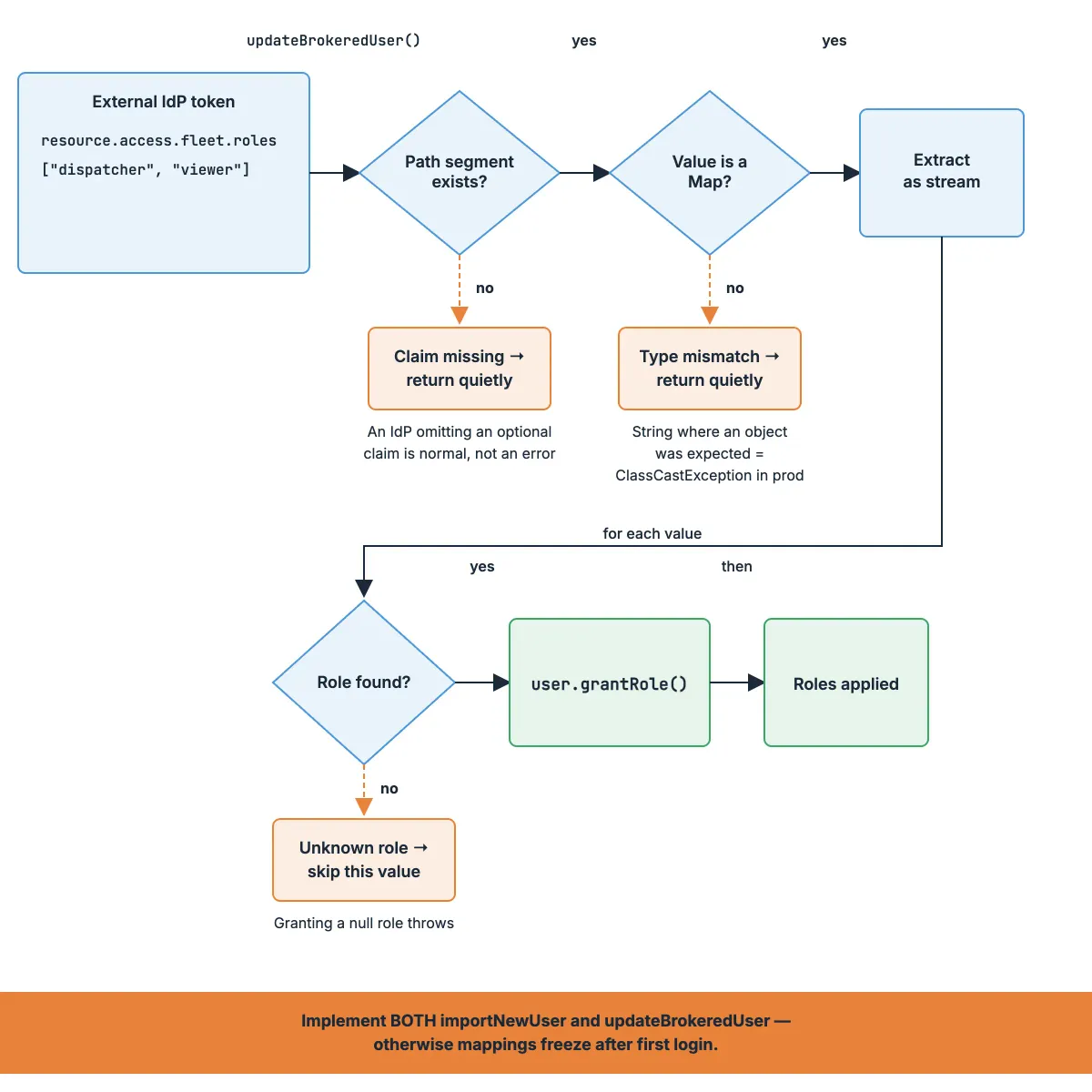
Two lifecycle methods, and both must be implemented. importNewUser runs on first login; updateBrokeredUser runs on every subsequent login.
           @Override
    public void importNewUser(KeycloakSession session, RealmModel realm,
                              UserModel user, IdentityProviderMapperModel mapper,
                              BrokeredIdentityContext context) {
        applyRoles(realm, user, mapper, context);
    }

    @Override
    public void updateBrokeredUser(KeycloakSession session, RealmModel realm,
                                   UserModel user, IdentityProviderMapperModel mapper,
                                   BrokeredIdentityContext context) {
        applyRoles(realm, user, mapper, context);
}Implementing only
importNewUseris the single most common mapper bug. Roles apply on day one, then never update again. Most teams discover it months later, when someone’s access should have been revoked and wasn’t.
The extraction itself, with null-safety at every hop:
           private void applyRoles(RealmModel realm, UserModel user,
                            IdentityProviderMapperModel mapper,
                            BrokeredIdentityContext context) {

        String path = mapper.getConfig().get(CLAIM_PATH);
        String prefix = mapper.getConfig().getOrDefault(ROLE_PREFIX, "");

        Object node = context.getContextData().get("UNTRUSTED_ID_TOKEN_CLAIMS");

        for (String segment : path.split("\\.")) {
            if (!(node instanceof Map<?, ?> map)) return;   // path broken — stop
            node = map.get(segment);
        }

        if (node == null) return;

        toStream(node)
            .map(v -> realm.getRole(prefix + v))
            .filter(Objects::nonNull)
            .forEach(user::grantRole);
    }
Two more pieces applyRoles leans on: getConfigProperties() describes the claim.path and role.prefix keys so they show up in the admin console, and toStream() normalises the claim value — a single string or a JSON array — into a stream either way.
           private static final List<ProviderConfigProperty> CONFIG_PROPERTIES = List.of(
            new ProviderConfigProperty(
                    CLAIM_PATH,
                    "Claim path",
                    "Dot-separated path to the nested claim, e.g. resource.access.fleet.roles",
                    ProviderConfigProperty.STRING_TYPE,
                    null),
            new ProviderConfigProperty(
                    ROLE_PREFIX,
                    "Role prefix",
                    "Prefix prepended to each claim value before looking up the realm role.",
                    ProviderConfigProperty.STRING_TYPE,
                    ""));

    @Override
    public List<ProviderConfigProperty> getConfigProperties() {
        return CONFIG_PROPERTIES;
    }
    private static Stream<?> toStream(Object node) {
        if (node instanceof List<?> list) {
            return list.stream();
        }
        return Stream.of(node);
    }
Three defensive choices worth calling out:
- A missing claim returns quietly. An IdP omitting an optional claim is normal, not an error. Throwing here breaks login for every user of that IdP.
- Unknown roles are filtered out.
realm.getRole()returns null for roles that don’t exist. Granting a null role throws; skipping it doesn’t. - The path walk checks the type at every level. A claim that is a string where you expected an object is a
ClassCastExceptionwaiting for production.
Service file:
META-INF/services/org.keycloak.broker.provider.IdentityProviderMapperMaking extensions survive upgrades
This is the section that matters six months from now.
Keycloak ships several releases a year. Extensions break not because the feature changed, but because an interface underneath it did.
Here is what actually breaks, and how to catch each one early.
| What changes | Typical symptom | How you catch it |
|---|---|---|
| Interface method added or removed | Compile error | Bump the version property, run mvn compile |
| Class moved between packages | NoClassDefFoundError at startup | Startup smoke test in CI |
spi-private internals refactored | Compiles, fails at runtime | Integration test that exercises the code path |
| FreeMarker template or theme variable renamed | Blank or broken login page | Screenshot-level manual check of each custom form |
| Jakarta / RESTEasy version shift | NoSuchMethodError | Recompile against the new BOM |
| Default flow or execution renamed | Realm import fails | Import your realm export into the new version |
| A CVE fix tightens validation | Previously accepted input now rejected | Read the release notes properly, once |
The upgrade sequence I follow
- Bump
keycloak.versionin the POM. Change nothing else. mvn clean verify. Fix compile breaks first — they are the honest ones.- Run the integration tests against the new server image.
- Import a production realm export into a throwaway instance of the new version.
- Manually exercise every custom login screen. Templates fail silently; only eyes catch it.
- Read the release notes for your major version, specifically the migration and deprecation sections.
Step 3 needs real tests, not mocks. Testcontainers makes this straightforward:
       @Testcontainers
class AuthenticatorIT {

    @Container
    static KeycloakContainer keycloak =
            new KeycloakContainer("quay.io/keycloak/keycloak:26.0.7")
                .withProviderClassesFrom("target/classes")
                .withRealmImportFile("test-realm.json");

    @Test
    void customAuthenticatorIsRegistered() {
        var info = keycloak.getKeycloakAdminClient()
                           .serverInfo().getInfo();

        assertThat(info.getProviders())
            .containsKey("authenticator");
    }
}
One more habit worth building: keep a short EXTENSIONS.md in the repo listing every spi-private class you touch, every FreeMarker template you ship, and every provider ID written into realm config.
Before an upgrade, that file is your checklist. Without it, you are re-discovering your own codebase under time pressure.
Test the downgrade too. If a realm import runs a schema migration, “rollback” is no longer a matter of swapping the container image. Know this before the maintenance window, not during it.
Deploying and verifying
Three checks before you call it done.
One — the provider is registered. Hit the admin REST endpoint:
       curl -s -H "Authorization: Bearer $TOKEN" \
  http://localhost:8080/admin/serverinfo | jq '.providers.authenticator'
Your getId() value should be in the list. If it isn’t, the build step didn’t pick up the JAR.
Two — the flow is bound. A registered authenticator that isn’t in a bound flow does nothing at all. Check the realm’s Authentication → Flows → bindings, not just the execution list.
Three — the logs say something. Your DEBUG category from the Compose file should show your provider executing on a real login. Silence means your code isn’t running.
Recap
- Exhaust config, themes and built-in mappers first. Every SPI is a permanent upgrade cost.
- Pin the Keycloak version in one property. It turns upgrades into a compile step instead of an investigation.
failureChallenge()for user errors,failure()for flow aborts. They are not interchangeable.- Implement both
importNewUserandupdateBrokeredUser. Otherwise your mappings freeze after first login. - Test with Testcontainers, not mocks. SPI bugs live in the wiring, and mocks never touch the wiring.
- Keep an
EXTENSIONS.md. Your future self, mid-upgrade, will thank you.
Full working code, tests and Compose setup: keycloak-spi-examples
Next in this series: Keycloak Realm Configuration as Code — how to stop clicking in the admin console, and verify two regions are byte-identical.
If this saved you an afternoon, follow along — I write about Keycloak, OAuth2 and identity architecture every few weeks.