
Published
- 10 min read
Keycloak Realm Configuration as Code: Stop Clicking in the Admin Console
Put your realm in git, gate changes behind CI, and prove two environments are identical.
Login works in staging. The same login fails in production.
Two hours later you find it: a required action enabled in one realm and not the other, toggled eight months ago by someone who has since left.
No audit trail. No diff. No way to have caught it.
That’s the real cost of a console-managed realm. Not the clicking — the fact that nobody can answer “what changed?” or “are these two realms the same?”
This guide puts realm configuration in git, applies it idempotently, gates every change behind a CI check that fails on undeclared drift, and gives you a way to prove two environments match.
This is Part 2 of a series on running Keycloak in production. Part 1 covers custom SPIs.
Working repo: keycloak-realm-as-code
Prerequisites
- Docker and Docker Compose
- A Keycloak instance you can throw away
- Basic familiarity with realms, clients and flows
Why the obvious answers don’t work
Most teams try these first. Here’s where each one stops.
Realm export/import. The export dumps everything — generated UUIDs, timestamps, computed defaults, hashed secrets. A one-line change produces a 400-line diff. You can’t review it, and you shouldn’t commit it.
Scripting the Admin REST API. Fine for creating things once. It falls apart the moment you need idempotency: does this client already exist, has this role drifted, what happens when the script dies halfway through?
Clicking carefully. This is what you’re trying to escape.
| Approach | Idempotent | Reviewable diff | Secrets | Verdict |
|---|---|---|---|---|
| Realm export/import | No — recreates | No — UUID noise | Baked into the file | Backup tool, not config management |
| Custom REST scripts | You build it | Yes, it’s your code | You build it | You’re writing a tool, not a realm |
| keycloak-config-cli | Yes | Yes — you write minimal YAML | Variable substitution | Recommended |
| Terraform provider | Yes | Yes | Terraform secret handling | Right call if you already run Terraform |
Picking a tool
The real choice is between two.
keycloak-config-cli (adorsys) takes YAML or JSON in Keycloak’s own export schema, and reconciles the realm to match. No state file. It runs as a one-shot job next to the server and exits.
The Terraform provider models realms as Terraform resources. If Keycloak is one piece of an estate you already manage in Terraform, this fits your existing workflow and your existing review process.
I use config-cli, for one reason: a realm is configuration, not infrastructure. Keycloak already stores the authoritative state in its own database. A Terraform state file adds a second source of truth that can disagree with the first, and reconciling realm drift against state drift is a worse problem than the one you started with.
If you’re already all-in on Terraform, the calculus flips — consistency with your existing tooling is worth more than the argument above.
The rest of this guide uses config-cli.
Check the version support matrix before you commit to this. config-cli is built against specific Keycloak releases and lags the latest by a few versions. Its Docker tags follow
a.b.c-x.y.z— config-cli version, then the Keycloak version it was built against. Pin that tag explicitly to the Keycloak you actually run. Usinglatestmeans your realm tooling silently changes underneath you.
A first working config
Start with a layout that separates what changes per environment from what doesn’t.
       realms/
  demo/
    realm.yaml          # the realm itself
    clients.yaml        # OIDC clients
    roles.yaml          # realm and client roles
env/
  dev.env               # per-environment values
  staging.env
  prod.env
docker-compose.yml
Splitting by resource type isn’t cosmetic — config-cli loads files by glob in alphabetical order, and a 900-line single file is exactly the reviewability problem you’re trying to solve.
The realm file, minimal on purpose:
       # realms/demo/realm.yaml
realm: demo
enabled: true
displayName: Demo Realm

sslRequired: external
loginWithEmailAllowed: true
registrationAllowed: false
resetPasswordAllowed: true

passwordPolicy: 'length(12) and notUsername and passwordHistory(3)'

bruteForceProtected: true
failureFactor: 10
Notice what isn’t there: no UUIDs, no timestamps, no accessTokenLifespan, no keys. Only the settings that deviate from Keycloak’s defaults.
Keep the file minimal — this is the whole discipline. Every default you copy in from an export is a value you now own forever, including through upgrades where Keycloak changes that default for good reason.
A client:
       # realms/demo/clients.yaml
clients:
  - clientId: demo-web
    name: Demo Web App
    enabled: true
    protocol: openid-connect
    publicClient: true
    standardFlowEnabled: true
    directAccessGrantsEnabled: false
    redirectUris:
      - '$(env:APP_BASE_URL)/*'
    webOrigins:
      - '$(env:APP_BASE_URL)'
    attributes:
      pkce.code.challenge.method: S256
And roles:
       # realms/demo/roles.yaml
roles:
  realm:
    - name: dispatcher
      description: Can assign and reassign jobs
    - name: viewer
      description: Read-only access
Run it with Compose — Keycloak, then a config-cli job that applies the config and exits:
       services:
  keycloak:
    image: quay.io/keycloak/keycloak:26.5.5
    command: ['start-dev']
    environment:
      KC_BOOTSTRAP_ADMIN_USERNAME: admin
      KC_BOOTSTRAP_ADMIN_PASSWORD: admin
    ports: ['8080:8080']

  config:
    image: adorsys/keycloak-config-cli:6.5.1-26.5.5
    depends_on: [keycloak]
    volumes:
      - ./realms:/config
    env_file: ./env/dev.env
    environment:
      KEYCLOAK_URL: http://keycloak:8080
      KEYCLOAK_USER: admin
      KEYCLOAK_PASSWORD: admin
      KEYCLOAK_AVAILABILITYCHECK_ENABLED: 'true'
      KEYCLOAK_AVAILABILITYCHECK_TIMEOUT: 120s
      IMPORT_FILES_LOCATIONS: '/config/demo/*'
      IMPORT_VARSUBSTITUTION_ENABLED: 'true'
KEYCLOAK_AVAILABILITYCHECK_ENABLED matters more than it looks — without it the job races Keycloak’s startup and fails on a cold docker compose up.
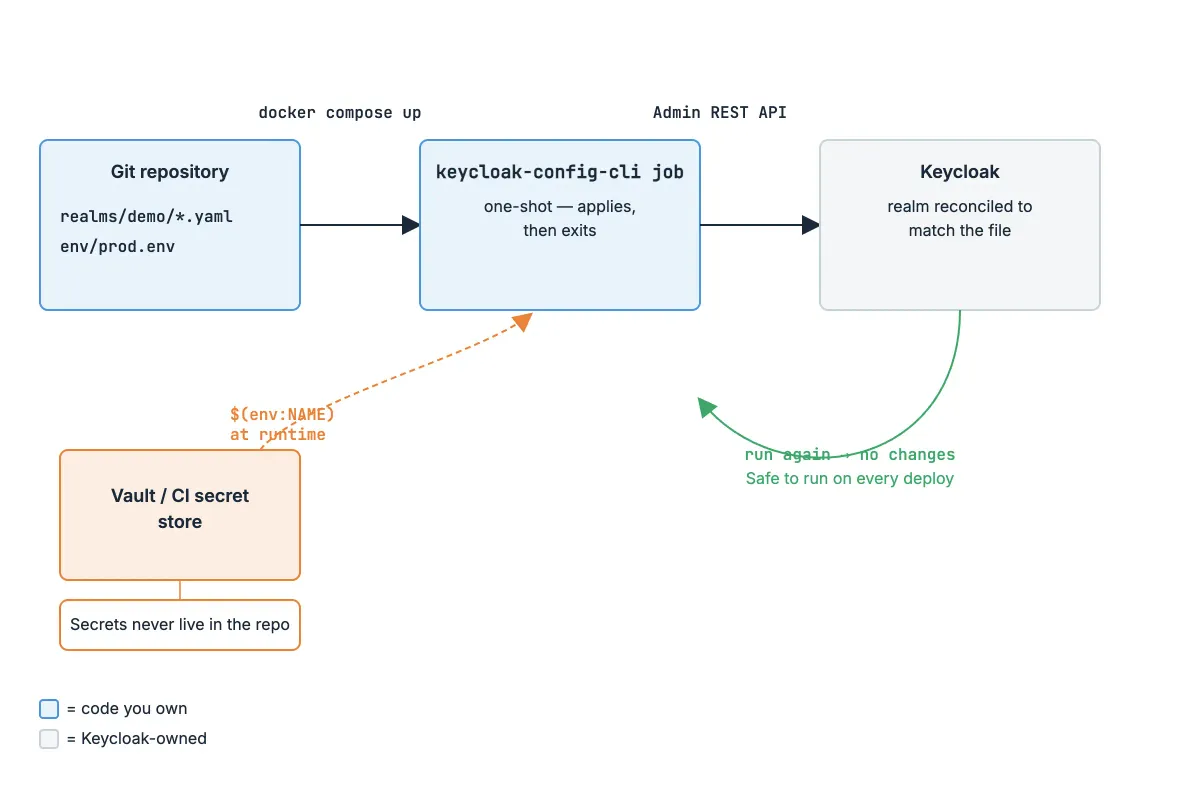

Run it twice. config-cli logs Importing file at INFO level on both runs regardless of whether anything actually changed, so don’t judge idempotency by the log lines. What you’ll see instead: the second run exits 0 and finishes noticeably faster — 15.6s on the first run versus 6.5s on the second in this setup — because unchanged files are skipped via checksum caching. That speed-up is the idempotency, and it’s the property that makes this safe to run on every deploy.
Three environments, one config
The failure mode here is predictable: someone copies realm.yaml into realm-staging.yaml, and three months later the two files have quietly diverged in ways nobody intended.
Don’t copy the file. Substitute the values.
Enable substitution with IMPORT_VARSUBSTITUTION_ENABLED=true, then reference variables as $(env:NAME):
       redirectUris:
  - '$(env:APP_BASE_URL)/*'
frontendUrl: '$(env:KEYCLOAK_PUBLIC_URL)'
With per-environment value files:
       # env/prod.env
APP_BASE_URL=https://app.example.com
KEYCLOAK_PUBLIC_URL=https://auth.example.com
The discipline is knowing what’s allowed to differ.
| Legitimately per-environment | Must be identical everywhere |
|---|---|
| Hostnames, redirect URIs, web origins | Authentication flows |
| External IdP endpoints and client IDs | Roles and role composition |
| SMTP settings | Password policy |
| Log level, debug flags | Required actions |
| Rate limits and brute-force thresholds | Client scopes and protocol mappers |
If a flow or a role differs between environments, that’s a bug — don’t encode it as configuration. The whole point of testing in staging is that staging behaves like production. A parameterised difference in an auth flow means you’re testing something you’ll never ship.
Secrets
Client secrets never go in the repo. Not encrypted, not base64, not “just this one”.
Substitute them the same way as everything else:
       clients:
  - clientId: backend-service
    secret: '$(env:BACKEND_CLIENT_SECRET)'
    serviceAccountsEnabled: true
    publicClient: false
Where the value actually comes from depends on where you run:
- Local dev — a gitignored
.envfile with throwaway values - CI — the runner’s secret store, injected as environment variables
- Production — Vault, AWS Secrets Manager, or your platform’s secret mechanism, fetched by the job at runtime
Add a pre-commit guard so a mistake fails locally rather than in review:
       #!/bin/sh
# .git/hooks/pre-commit
if git diff --cached -U0 realms/ | grep -qE '^\+.*secret:\s*["'"'"']?[A-Za-z0-9._-]{16,}'; then
  echo "Possible hardcoded secret in realm config. Use \$(env:NAME)."
  exit 1
fiIf a secret already reached git, rotating it is the fix — not rewriting history. History rewrites don’t reach clones, forks, CI caches, or anyone’s local checkout. Rotate in Keycloak, then clean up the history if you want to, in that order.
The dry-run CI stage
Everything so far makes changes declarable. This is what makes them verifiable.
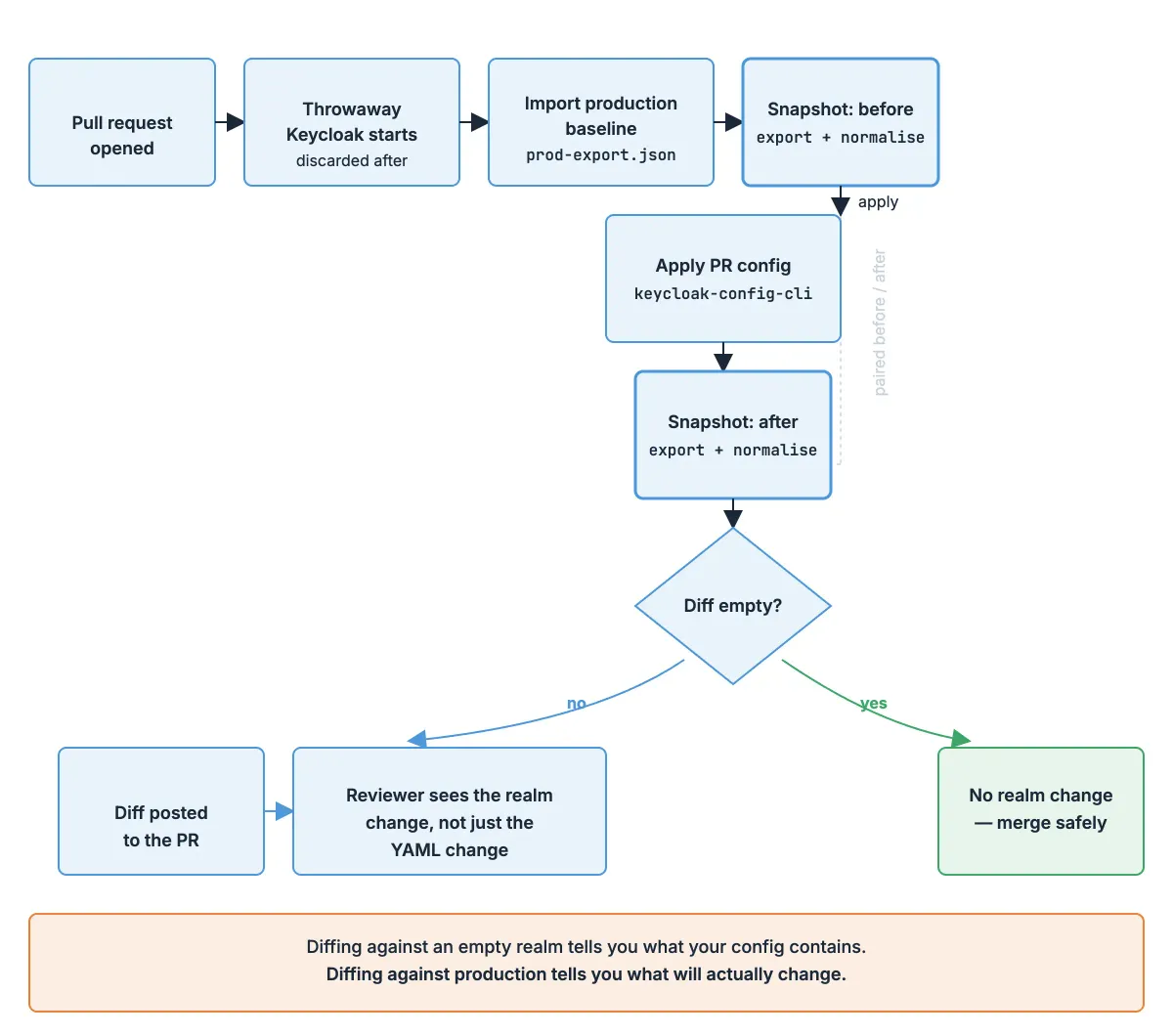
The idea: on every pull request, stand up a throwaway Keycloak, load the current production baseline, apply the PR’s config, and diff. If the realm changed in ways the PR didn’t declare, fail.
       # .github/workflows/realm-dry-run.yml
name: Realm dry run

on: [pull_request]

jobs:
  dry-run:
    runs-on: ubuntu-latest
    steps:
      - uses: actions/checkout@v4

      - name: Start Keycloak
        run: |
          docker run -d --name keycloak \
            -p 8080:8080 -p 9000:9000 \
            -e KC_BOOTSTRAP_ADMIN_USERNAME=admin \
            -e KC_BOOTSTRAP_ADMIN_PASSWORD=admin \
            -e KC_HEALTH_ENABLED=true \
            quay.io/keycloak/keycloak:26.5.5 start-dev

      - name: Wait for Keycloak
        run: |
          for i in $(seq 1 24); do
            if curl -sf http://localhost:9000/health/ready > /dev/null; then
              echo "Keycloak is ready"
              exit 0
            fi
            echo "Waiting for Keycloak ($i/24)..."
            sleep 5
          done
          echo "Keycloak did not become healthy in time"
          docker logs keycloak
          exit 1
Then the steps that do the work:
       - name: Load production baseline
  run: ./scripts/apply.sh baseline/prod-export.json

- name: Snapshot before
  run: ./scripts/export-normalised.sh > /tmp/before.json

- name: Apply PR config
  env:
    APP_BASE_URL: https://app.example.com
    BACKEND_CLIENT_SECRET: ci-placeholder-secret
  run: ./scripts/apply.sh realms/demo

- name: Snapshot after
  run: ./scripts/export-normalised.sh > /tmp/after.json

- name: Diff
  run: |
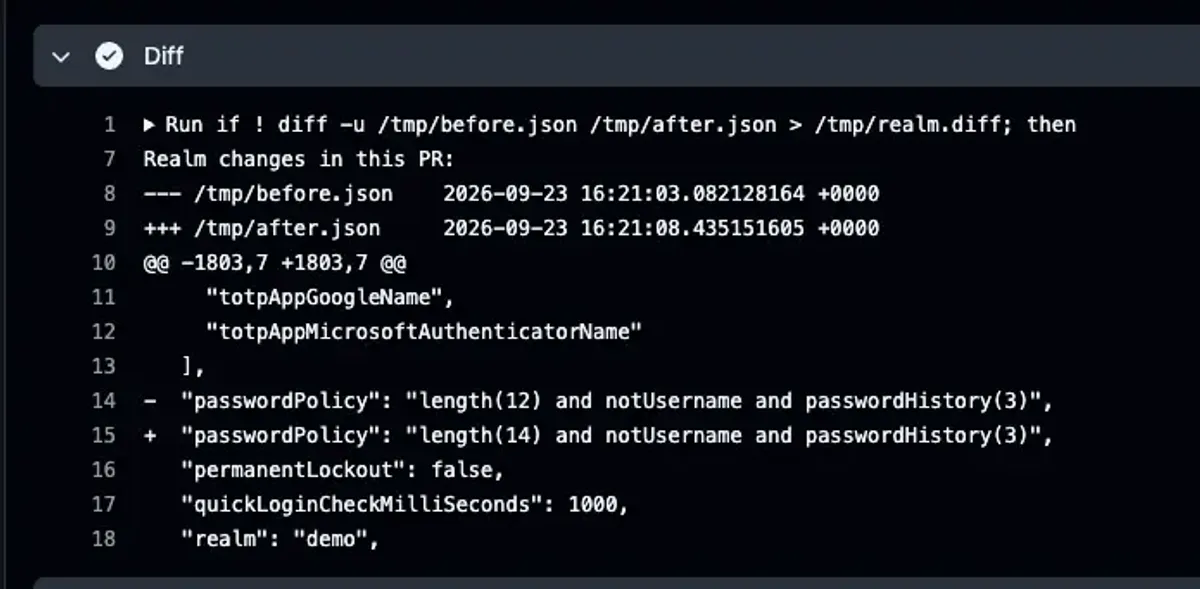
    if ! diff -u /tmp/before.json /tmp/after.json > /tmp/realm.diff; then
      echo "Realm changes in this PR:"
      cat /tmp/realm.diff
    fi
Two things make this useful rather than noisy.
The diff is posted, not just failed on. A reviewer sees exactly what the realm will look like after merge — in realm terms, not YAML terms. That’s a different and more useful artifact than the file diff GitHub already shows.
The baseline is a real production export, refreshed on a schedule. Diffing against an empty realm tells you what your config contains. Diffing against production tells you what will actually change.
Proving two realms match
“Is staging actually identical to production?” should be a command, not an afternoon.
The reason it usually isn’t: raw exports never match. Keycloak assigns fresh UUIDs per realm, returns arrays in arbitrary order, and embeds timestamps and rotating keys. Diff two exports of genuinely identical realms and you’ll get hundreds of lines of noise.
So normalise first:
       #!/bin/bash
# scripts/normalise.sh — make an export diffable
jq '
  walk(if type == "object" then del(.id, .containerId) else . end)
  | .clients          |= sort_by(.clientId)
  | .roles.realm      |= sort_by(.name)
  | .clientScopes     |= sort_by(.name)
  | .authenticationFlows |= sort_by(.alias)
  | del(.components)
  | del(.keycloakVersion)
' "$1"
Then comparison is trivial:
       diff <(./scripts/normalise.sh staging-export.json) \
     <(./scripts/normalise.sh prod-export.json)
Empty output means the realms match. Non-empty output is a list of real differences, each one either intentional or a bug.
Three things you must filter, and should understand rather than just copy:
idandcontainerId— per-realm UUIDs. Always differ, never meaningful.- Array ordering — Keycloak doesn’t guarantee order for clients, roles, scopes or flows. Sort them.
components— contains realm keys, which rotate. These genuinely should differ between environments.
Run this as a scheduled job, not just on demand. The value isn’t answering “do they match today” — it’s finding out within a day of someone making a console change that bypassed the pipeline.
Migrating a realm that already exists
Nobody starts from an empty realm. You have a production realm built over three years, and you need it in git without an outage.
config-cli has a built-in operation for exactly this. Given a full export, it strips everything matching Keycloak’s defaults and leaves only your actual deviations:
       docker run --rm -v "$PWD:/data" \
  adorsys/keycloak-config-cli:6.5.1-26.5.5 \
  --run.operation=NORMALIZE \
  --normalize.files.location=/data/prod-export.json \
  --normalize.output-directory=/data/out
That gets you from a 4,000-line export to something reviewable in one step.
Two limits worth knowing before you rely on it:
componentsare skipped — LDAP federation and key providers aren’t normalised. Handle those by hand.- Users aren’t included. Correct behaviour: user data doesn’t belong in realm config.
The safe sequence from there:
- Export production, normalise it, commit the result
- Apply it to an empty throwaway realm
- Export that, normalise both, diff
- Fix what’s missing, repeat until the diff is empty
- Only then point the pipeline at a real environment
Expect three or four passes. The gaps are usually authentication flow executions and client scope assignments, which is also where the interesting configuration lives.
Don’t run config-cli against production until step 4 gives you an empty diff. config-cli reconciles toward your file — anything you failed to capture is something it may remove.
Recap
- A realm is configuration, not infrastructure. That’s why config-cli beats a state file here, unless you’re already running Terraform.
- Keep the YAML minimal. Every default you copy in is one you now own through every upgrade.
- Substitute values, never duplicate files. Hostnames differ per environment; flows and roles must not.
- Pin the config-cli tag to your Keycloak version. It lags the latest release by design.
- Normalise before diffing, or the noise will convince you the tool is broken.
- Diff against a production baseline in CI, not an empty realm. That’s what turns a config file into a change-review process.
Full repo with the config, scripts and workflow: keycloak-realm-as-code
Next in this series: Upgrading Keycloak in production without breaking logins — what actually breaks, and the checklist that catches it.