
Published
- 9 min read
Upgrading Keycloak in Production Without Breaking Logins
A repeatable sequence for Keycloak upgrades — read the release notes properly, rehearse against a real database copy, and test the rollback before the maintenance window.
A scanner flags CVE-2026-17526 against your running Keycloak 26.5.x. The bug lets an account holding the impersonation role escalate to impersonating a realm administrator. It’s fixed in 26.7.4, released September 16, 2026, along with five other CVEs — including a SAML DEFLATE compression issue (CVE-2026-18212).
Now you have a deadline, not a maintenance window you chose.
Here’s the thing nobody says out loud: it’s never the upgrade itself that breaks production. It’s the thing nobody tested — a renamed theme variable, a default that flipped silently, an extension built against an internal API that happened to work for eighteen months. Keycloak’s own release notes are usually accurate. The failure mode is that most teams don’t read them, and the ones that do skim the headline features and miss the migration guide.
This is Part 3 of a series on running Keycloak in production. Part 1 covers custom SPIs, and Part 2 covers realm configuration as code.
This is the sequence I run every time, turning “upgrade weekend” into a normal Tuesday. If you’ve been following this series, it reuses two techniques from earlier posts: the realm normalization diff from part 2, and the SPI compatibility instincts from part 1.
Everything below assumes you’re already running realm config as code and have a CI pipeline that can apply it. If you’re still clicking through the admin console, do that first — an upgrade rehearsal is only as good as your ability to reproduce production state in staging.
Read the release notes properly — once
Every Keycloak release ships an “Upgrading Guide” section most people never open. It has three parts, and only one of them is what people usually look for.
- CVEs. Check severity and whether the fix touches your active flows — impersonation, token exchange, SAML, whatever you actually have wired up. Not every CVE in a release affects your deployment.
- Removed and Deprecated. Read both, every release, even ones you’re not planning to adopt features from. A removed config key doesn’t error — Keycloak just ignores it and moves on with the default.
- Default value changes. The dangerous category, because nothing breaks loudly. Behavior just changes.
A deprecation warning today is a removal notice for next major. Don’t defer fixing it just because it still works — “still works” is exactly the trap.
What actually breaks, categorized
This is a different failure matrix than the SPI-upgrade one from part 1. That one was about compile-time API drift in your own extension code. This one is about the server upgrade itself.
| What changes | Typical symptom | How you catch it |
|---|---|---|
| Removed config option | Silent no-op — server boots fine, feature just isn’t there | Diff your applied config against the release’s removed-options list before upgrading |
| Theme/FreeMarker variable renamed | Blank or broken custom login page | Manual visual check of every custom theme page in staging |
| Default value flip | Works differently, not obviously broken | Read the “Default value changes” section; don’t assume “no error” means “no change” |
| CVE fix tightens validation | Previously-accepted input now rejected | Read the CVE’s technical description, not just the CVSS score |
Extension built on spi-private | Compiles clean, fails at runtime | Integration test that actually exercises the extension’s code path against the new version |
The last row is the one that bites hardest, because it passes your build. If part 1 convinced you to avoid keycloak-server-spi-private in the first place, this is the payoff — public SPI extensions rarely land in this row at all.
The staging rehearsal
The rehearsal has one rule that gets skipped more than any other: test against a copy of your real database, not an empty realm.
An empty realm proves the new version can boot. It proves nothing about your actual data — the users, the client configs, the custom attributes and role mappings accumulated over however many years this realm has existed. Schema migrations are where real breakage lives, and a migration only runs against data that exists.
       # 1. Snapshot production — either the DB directly, or the normalised
#    realm export you already have from your config-as-code pipeline
pg_dump -h prod-db-host -U keycloak -d keycloak > keycloak-prod-snapshot.sql

# 2. Restore into a staging Postgres instance
createdb -h staging-db-host -U keycloak keycloak_staging
psql -h staging-db-host -U keycloak -d keycloak_staging < keycloak-prod-snapshot.sql

# 3. Bump ONLY the image tag. Nothing else changes in this step.
#    docker-compose.yml: image: quay.io/keycloak/keycloak:26.7.4
docker compose up -d

# 4. If you have custom extensions, rebuild before boot
kc.sh build

# 5. Watch startup for provider registration failures
docker compose logs -f keycloak | grep -i "provider\|spi\|error"Testing against an empty realm proves the new version boots. It proves nothing about your actual data. Always rehearse against a database copy.
Bump the version and nothing else in that step — not extensions, not config, not both at once. If something breaks, you want exactly one variable to have changed.
The smoke-test checklist
This is the part everyone reinvents under pressure at 2am during the actual maintenance window, because nobody wrote it down beforehand. Write it down beforehand.
Six things, every upgrade, no exceptions:
- A real login through the browser flow — not just a token grant, the actual UI
- Token issuance and validation for every grant type you use in production
- Every custom SPI registers — check
/admin/serverinfoand confirm your provider IDs are listed - Every custom login theme page renders — the actual pages, not just that the theme loads
- One real federated login through each configured identity provider
- Admin console loads and a realm-admin action actually completes
A small script covers the parts that don’t need a browser:
       #!/usr/bin/env bash
set -euo pipefail

KC_URL="${KC_URL:-http://localhost:18080}"
REALM="${REALM:-demo}"
CLIENT_ID="${CLIENT_ID:-smoke-test-client}"
CLIENT_SECRET="${CLIENT_SECRET:?set CLIENT_SECRET}"

echo "== Token grant =="
TOKEN_RESPONSE=$(curl -sf -X POST \
  "${KC_URL}/realms/${REALM}/protocol/openid-connect/token" \
  -d "grant_type=client_credentials" \
  -d "client_id=${CLIENT_ID}" \
  -d "client_secret=${CLIENT_SECRET}")

ACCESS_TOKEN=$(echo "$TOKEN_RESPONSE" | jq -r '.access_token')

if [ "$ACCESS_TOKEN" = "null" ] || [ -z "$ACCESS_TOKEN" ]; then
  echo "FAIL: no access token returned"
  echo "$TOKEN_RESPONSE"
  exit 1
fi
echo "PASS: token issued"

echo "== SPI registration =="
SERVER_INFO=$(curl -sf "${KC_URL}/admin/serverinfo" \
  -H "Authorization: Bearer ${ACCESS_TOKEN}")

for provider in "review-confirm-authenticator" "no-identity-in-password" "nested-claim-to-role-mapper"; do
  if echo "$SERVER_INFO" | jq -e --arg p "$provider" \
     '.. | objects | select(.id? == $p)' > /dev/null 2>&1; then
    echo "PASS: ${provider} registered"
  else
    echo "FAIL: ${provider} not found in serverinfo"
    exit 1
  fi
done

echo "== Realm well-known endpoint =="
curl -sf "${KC_URL}/realms/${REALM}/.well-known/openid-configuration" > /dev/null
echo "PASS: realm reachable"

echo "All smoke tests passed."
Run it locally by hand, or drop it into the same CI dry-run job from part 2 as a post-boot gate. It won’t catch a broken theme page or a broken federated login — those still need eyes on a browser — but it catches the failures that are easy to miss under pressure.
ACR values, login_hint, and token claim drift
The specific gotcha this series has been building toward. ACR (Authentication Context Class Reference) mapping and login_hint handling have both changed behavior across minor Keycloak versions without always being called out prominently in release notes — because from Keycloak’s side, they’re bug fixes, not breaking changes. From your side, if a downstream service was depending on the old behavior, it’s a break.
The reliable way to catch this: decode and diff a real token, before and after, for the same test user and the same client. Same normalization principle as the realm diff from part 2 — strip anything that’s supposed to change (iat, exp, jti), then compare what’s left.
       # Decode a JWT payload for comparison (no verification, just the claims)
decode_token() {
  echo "$1" | cut -d '.' -f2 | base64 -d 2>/dev/null | jq -S \
    'del(.iat, .exp, .jti, .session_state, .sid)'
}

decode_token "$TOKEN_BEFORE_UPGRADE" > before.json
decode_token "$TOKEN_AFTER_UPGRADE" > after.json
diff before.json after.json
A quietly disappeared claim is the worst version of this bug — nothing errors, a downstream service just starts receiving null for a field it used to get a value for, and the failure surfaces somewhere else entirely, days later.
Rollback — and why it usually isn’t one
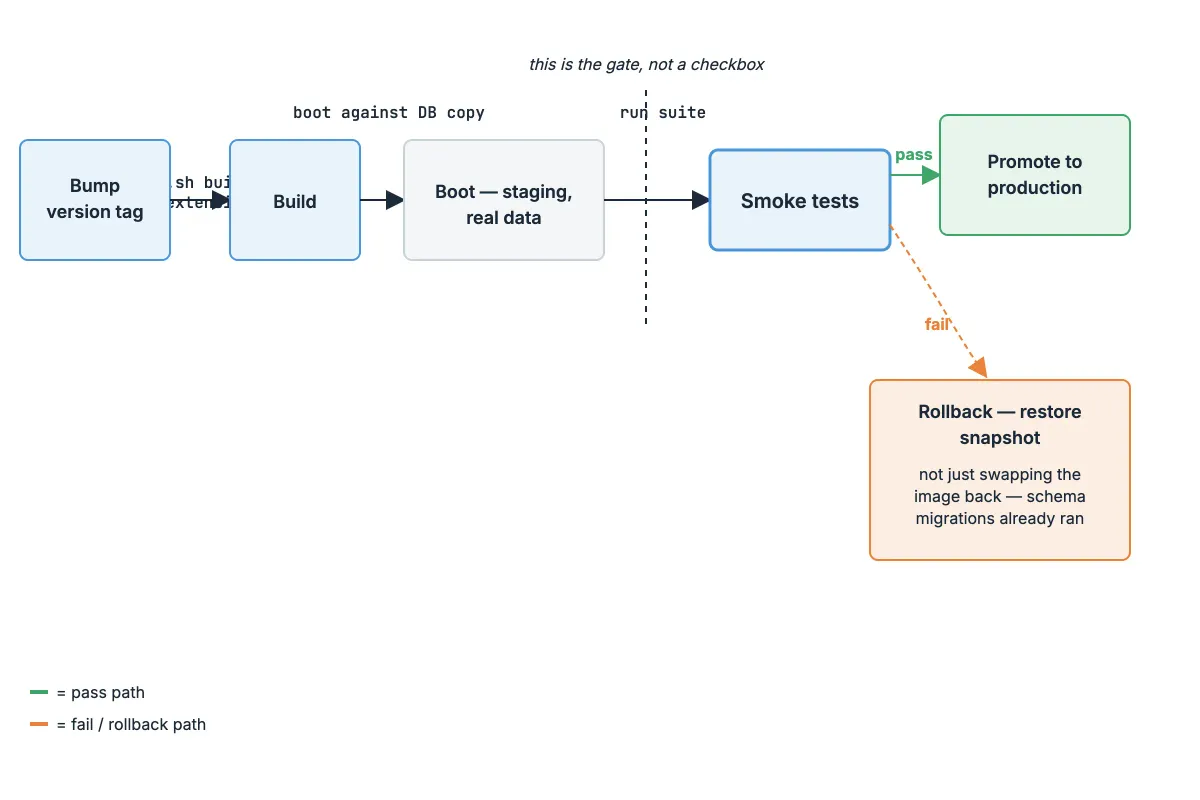
If a schema migration ran during the upgrade, “rollback” doesn’t mean swapping the container image back to the old tag. The database schema has already changed. Booting the old image against the new schema is its own, different way to break production.
Three things to settle before the maintenance window, not during it:
- Restore the pre-upgrade snapshot, don’t just revert the image, if any migration ran
- Decide the rollback trigger in advance — which specific smoke-test failure is the one that aborts, versus which one you’d accept and fix forward
- Test the rollback path once, in staging, before you need it for real. An untested rollback plan has the same failure modes as an untested upgrade plan, just at the worst possible moment
An upgrade plan without a tested rollback isn’t a plan — it’s a bet.
The maintenance-window runbook
- Announce the window. Freeze other deploys touching auth.
- Snapshot the database.
- Bump the version. Rebuild extensions if any are involved.
- Boot against the snapshot copy — never the live database directly, until smoke tests pass.
- Run the full smoke-test suite.
- Pass → promote to production. Fail → roll back immediately. Don’t debug live during the window.
- Post-upgrade: re-run the smoke suite against real production traffic for the first hour, not just the staging rehearsal.
Recap
- Read the release notes’ Removed, Deprecated, and default-value-change sections every time — not just the CVE list
- Categorize what can break: config, theme, defaults, validation,
spi-private— and test for each category specifically - Rehearse against a real database copy, never an empty realm
- Write the smoke-test checklist down before you need it under pressure
- Decide the rollback trigger before the window, and test the rollback path once in staging
Next in this series: Part 4 moves from operating Keycloak to the identity problems that show up once AI agents start authenticating as first-class actors in your realms — not users, not services, something in between that most IAM designs don’t have a clean answer for yet.